MyBazaar brand assets
Companion Pose Brief
Everything needed to generate four new mascot poses in Gemini that match the ones already shipping — the reference image, the exact prompt, and the checks to run before accepting a result.
How to run it
- Attach the referenceDownload
sheet1.pngbelow and attach it to the Gemini chat. Without it the creature drifts. - Describe four posesFill the four boxes, which splice into the prompt. Always four per image — consistency collapses when poses are generated one at a time.
- Copy and sendCopy the assembled prompt, paste it into the same message as the image, send.
- Check before acceptingRun the result past the defect list. Regenerate rather than retouching.
0 · Which model
Every pose in the current set was generated with Gemini's image model — internally gemini-3.1-flash-image. Staying on the same model is the single cheapest way to keep new poses consistent with the existing 32.
In the Gemini app the model is not labelled with that id. What matters is picking the mode that generates an image from an attached reference image, not text-to-image from scratch. If the reply comes back as a written description instead of a picture, the wrong mode is selected.
Image quota is small — roughly a handful of images per window, and windows reset on a multi-hour cycle. This is the real reason to put four poses on one sheet and to check the pose grid below before generating: a near-duplicate costs a whole window.
A different image model — Midjourney, DALL·E, Firefly, Stable Diffusion — will not hold this character. It will produce something broadly similar that does not match, which is worse than nothing, because the mismatch only becomes obvious once the pose is sitting next to its neighbours on the site.
1 · The reference image
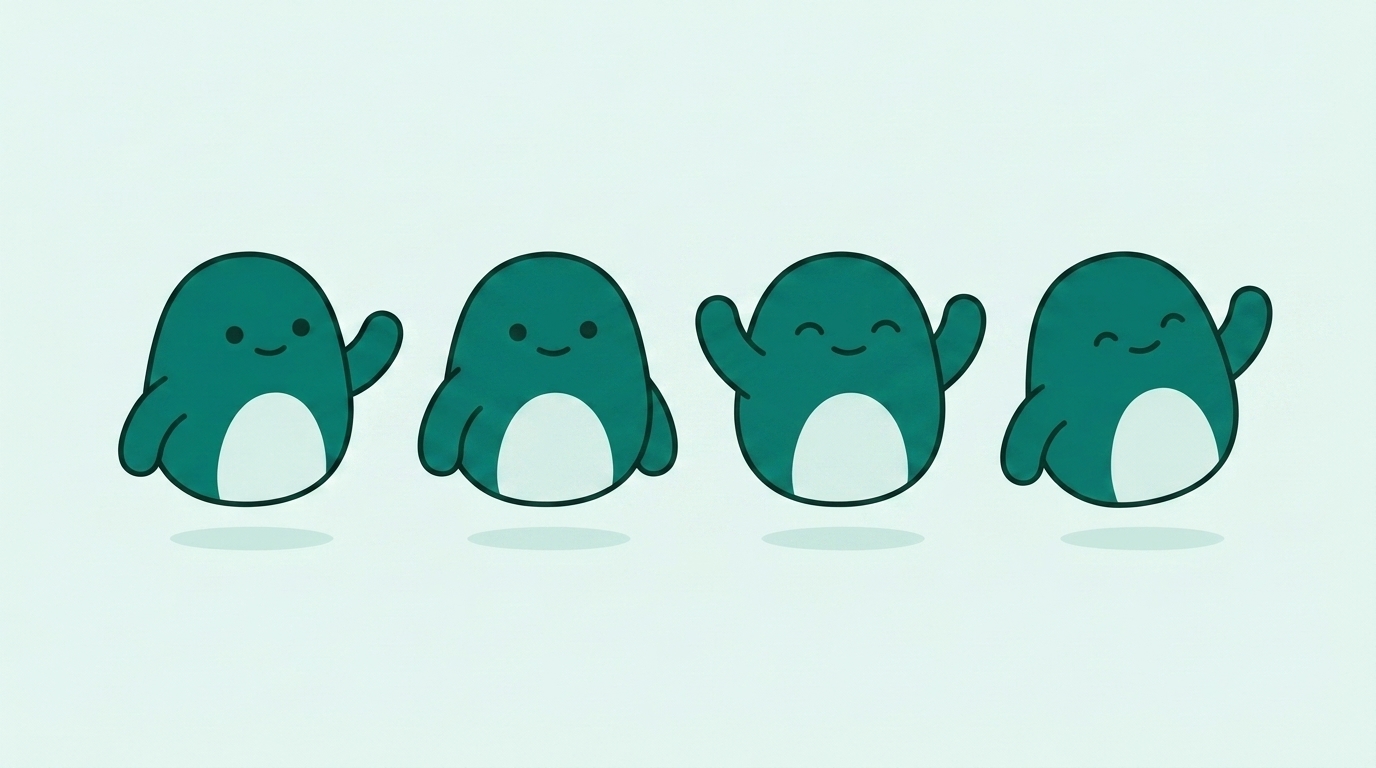
Attach this one, every time
This is the canonical sheet. It is the cleanest rendering of the character and the one all current poses are matched against.
Do not reference any other sheet, and do not reference an existing pose cut-out. Earlier sheets that were referenced back to the original sketch drifted in proportion and in the shape of the belly patch.
Download sheet1.png2 · Describe the four poses
One short phrase each — the action, the expression, and the prop if there is one. Keep every prop blank: no text, no numbers, no labels. Example: holding up a blank ticket stub, smiling.
Describing a prop or tool
- Say which arm holds it"a spoon held in its left arm" rather than "with a spoon". Unattached props get drawn standing next to the creature, where they read as scenery instead of something it is using.
- Two objects means one per armTwo objects splayed from a single grip point read as scissors. A fork in one arm and a spoon in the other reads as cutlery.
- Name the prop's colourSay "a pale mint clipboard" or "a teal bag". An unspecified prop comes back kraft brown, which is outside the palette.
- Keep props compactAnything on a long pole or handle — a flag, a broom, a banner — makes the overall artwork taller, so the creature itself is drawn smaller in the fixed-height slots on the site and looks shrunken next to its neighbours.
- Blank, alwaysSay "completely blank" for any surface that could carry writing: a screen, a sign, a page, a ticket, a label.
3 · The prompt
The last three paragraphs look like over-explaining. They are not — each one is a defect that actually shipped and had to be regenerated. Do not trim them.
4 · Rules that are not style preferences
- Every prop stays blankA hallucinated price, shop name or count is a fabrication on a trust brand's marketing site. Cards, screens, signs, books, tickets — all blank.
- No legs, no feet, everIncluding sitting, jumping and walking. The creature floats above a soft elliptical shadow.
- Nothing brownThe model reaches for kraft brown on bags, boxes, flags and wood. Those must be teal or pale mint.
- Six colours, no seventhA second tone of teal used as shading is the most common drift. Flat fills only.
- Four identical creaturesOnly the pose, arms, expression and prop may change between the four. Size, proportion, outline weight and colour must not.
5 · Check the result before accepting it
Each row is a defect that reached a finished sheet at least once. Scan for all seven — then view it at the size it will actually be used, which is small.
| Look for | Where it slipped through |
|---|---|
| Brown or tan on a prop | A flag and a paper bag came back kraft brown |
| Legs or feet | Three of four poses on one sheet grew them |
| A tongue in the mouth | One pose, in magenta |
| Belly patch changed shape | Teardrop in one sheet, egg in the next |
| Creatures different sizes | Proportion wobble between sheets |
| Stray dots near the face | Only caught by looking closely |
| Poses touching or overlapping | Two poses merged; they then cannot be cut apart cleanly |
If a sheet fails on one pose out of four, regenerate the whole sheet. Mixing poses from different sheets is how the set drifted in the first place.
6 · The 32 poses that already exist
Check here first — a pose that already exists should not be regenerated, and a near-duplicate costs a generation window for nothing. Props and tools are the gap worth filling: tools of a trade, a delivery bag, a measuring tape, a calendar.
7 · When a sheet is approved
Send the raw PNG back untouched — full sheet, all four poses, no cropping, no background removal, no retouching.
Cutting the poses out, trimming the background, cleaning the edges and producing the SVG versions are all handled by an automated pipeline that expects the untouched sheet. Edits made by hand before that point have to be undone.